

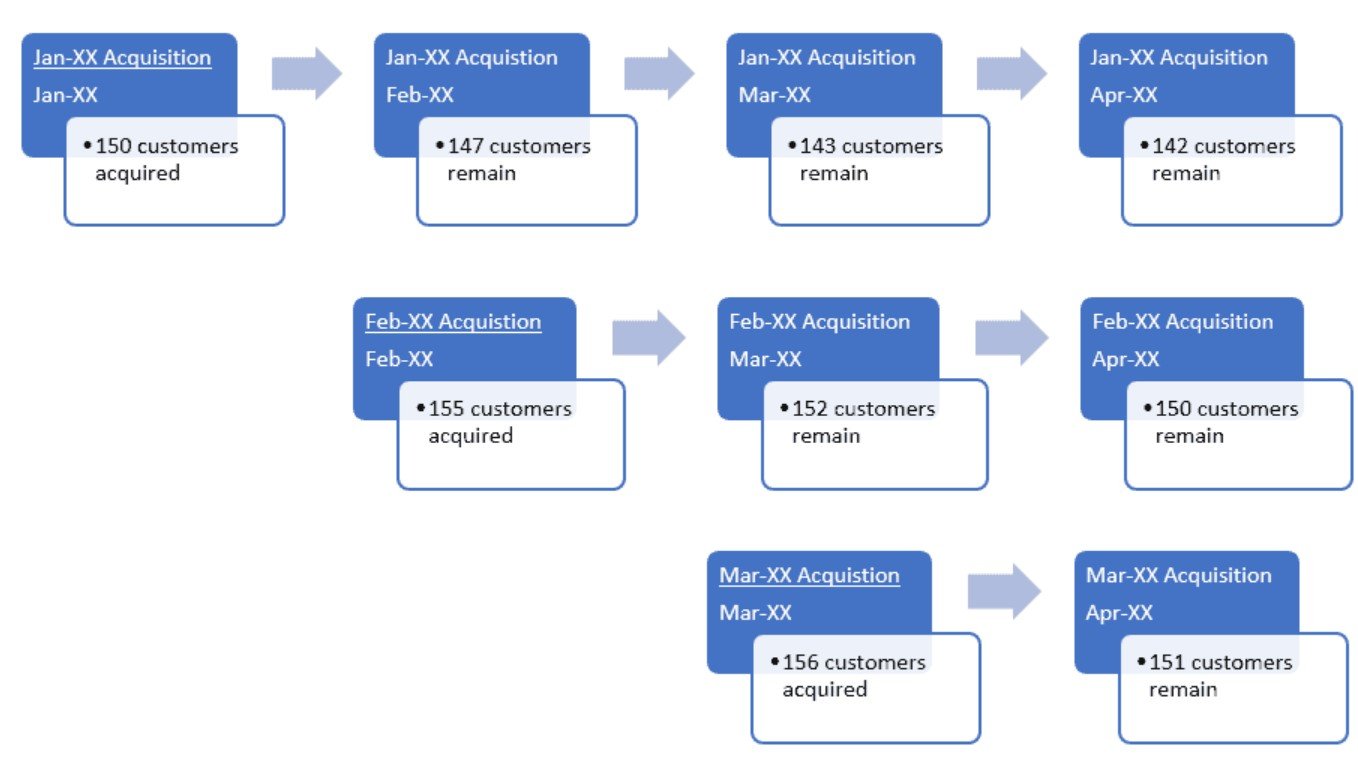
Cohort analysis is one of the most practical ways to understand how groups of users behave over time. Instead of looking at all users as one blended population, you segment them into cohorts, usually based on a shared start event such as first purchase, signup month, or first app session. You then track how each cohort performs across subsequent periods. This approach helps answer questions like: Do users who joined in November retain better than those who joined in December? Do discounts improve repeat purchases after the first order? Which onboarding changes reduce early churn?
SQL window functions are ideal for cohort analysis because they let you compute metrics across rows without collapsing your dataset into rigid aggregates. With functions like LAG(), RANK(), and SUM() OVER, you can compare periods, calculate running totals, and rank behaviours while keeping the underlying granularity intact. If you are building analytical depth through business analytics classes, mastering these tools will elevate your cohort reporting from basic retention tables to richer behavioural insights.
Why Window Functions Fit Cohort Analysis Better Than Traditional Aggregations
Traditional SQL aggregations are powerful, but they force you to group data and lose row-level context. Cohort analysis often needs both: a cohort label and the ability to compare each period with a previous one, compute cumulative outcomes, or identify the first occurrence of an event.
Window functions solve this by adding analytical “views” over data. You can partition by cohort and order by time, then compute calculations across those partitions without reducing the dataset. This makes it easier to answer questions such as:
- What is the month-over-month change in retention for each cohort?
- Which cohort has the highest cumulative revenue by week 8?
- How does repeat purchase behaviour evolve after the first transaction?
In practice, this means fewer temporary tables, less complicated joins, and clearer logic that is easier to maintain.
Building the Cohort Foundation: Cohort Month and Activity Month
Before using window functions, you need a reliable cohort definition. A common pattern is to assign each user to a cohort based on the first time they performed a key action, such as their first purchase date. You also define an activity period, such as the month in which they returned or purchased again.
A typical cohort dataset includes:
- user_id
- cohort_month (derived from first event date)
- activity_month (derived from event date)
- cohort_index (how many periods since cohort start)
- metrics such as orders, revenue, or active flags
The cohort index is especially important because it allows you to align cohorts by lifecycle stage rather than calendar time. For example, month 0 means acquisition month for every cohort, month 1 means the first return period, and so on. Once that structure exists, window functions become straightforward to apply for deeper analysis.
Using LAG() to Measure Period-to-Period Retention and Behaviour Shifts
LAG() is one of the most useful functions for cohort work because cohort analysis is fundamentally about change over time. With LAG(), you can compare a cohort’s current period metric to its previous period metric inside the same cohort partition.
For retention, you might calculate active users in each cohort month and then use LAG(active_users) to compute:
- retention drop from month 1 to month 2
- acceleration or slowdown in churn
- recovery patterns after product changes
You can apply the same method to revenue, orders, or sessions. This is useful when retention is stable, but spending declines, or when spend increases even as the active base shrinks. These insights are hard to spot in simple cohort tables because the change is not always obvious unless you compute it explicitly.
Using SUM() OVER for Cumulative Revenue and Lifetime Value Curves
Many cohort questions revolve around cumulative outcomes. For example, a team may ask whether cohort A reaches a meaningful revenue threshold faster than cohort B. SUM() OVER allows you to compute running totals over time per cohort, which is a direct way to build lifetime value curves and payback models.
A typical logic is to partition by cohort and order by cohort index, then compute cumulative revenue:
- cumulative revenue by month since acquisition
- cumulative orders by week since first purchase
- cumulative sessions by day since signup
This is especially valuable in subscription and e-commerce settings where the early lifecycle determines long-term profitability. It also helps teams evaluate experiments more accurately. A cohort that looks weak in month 1 might catch up by month 3, and cumulative curves make that visible.
If you are learning reporting frameworks in business analytics classes, this is one of the most practical applications of window functions because it directly connects SQL skills with decision-making around retention, monetisation, and product strategy.
Using RANK() and Related Functions to Compare Cohorts Fairly
Cohort comparisons can be misleading if you do not standardise what you are comparing. Rankings help create clarity when multiple cohorts compete across the same metric. With RANK() or DENSE_RANK(), you can rank cohorts by retention in month 2, by revenue in month 6, or by cumulative orders at a given lifecycle point.
This helps in prioritisation. If you have many cohorts, ranking makes it easier to see which acquisition period produced the most valuable users. It also supports operational decisions, such as focusing on channels, campaigns, or onboarding flows that drove the best cohorts.
Rankings are also useful for anomaly detection. If one cohort suddenly ranks far higher or lower than the rest, it signals a meaningful change, possibly driven by marketing, pricing, or product updates.
Conclusion
SQL window functions make cohort analysis more powerful because they allow comparisons, cumulative tracking, and fair ranking without losing data detail. LAG() supports period-to-period shifts, SUM() OVER builds cumulative outcomes like lifetime value curves, and RANK() helps compare cohorts consistently across lifecycle stages. With a strong cohort foundation and thoughtful metrics, these functions turn cohort tables into analytical narratives that guide retention strategies, monetisation planning, and product optimisation.
